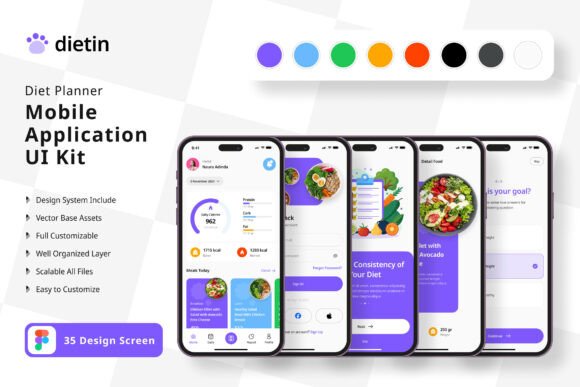
Diet Planner App Mobile UI KIT: Build Your App Faster
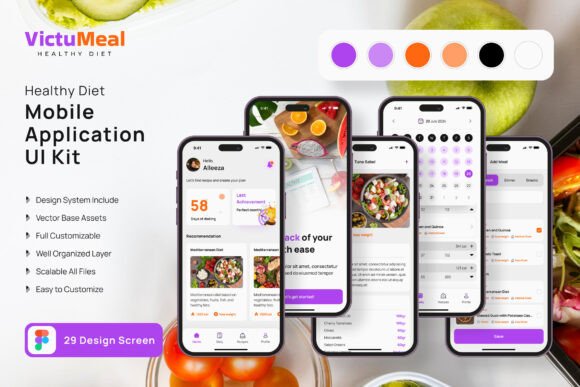
Imagine transforming your wellness app idea from a rough sketch into a polished, professional mobile application in a fraction of the usual time. This is the promise of a well-structured design system, and the Diet Planner App Mobile UI KIT is a prime example. Consisting of 35 high-quality, pixel-perfect templates, this kit provides a comprehensive foundation for anyone looking to create a sleek and functional diet or health tracking application without starting from scratch.
This resource is more than just a collection of screens; it's a complete design asset library. It includes over 80 UI elements, fully scalable vector layers, and symbol objects, all meticulously organized in Figma. The true value lies in its flexibility and ease of use. You can customize every screen, adding or subtracting elements to match your unique vision. With free fonts and icon vectors included, it streamlines the entire design-to-development workflow, making it an ideal choice for designers, entrepreneurs, and developers alike.
Why a Modular UI Kit is a Game-Changer
Building a mobile app from the ground up involves countless decisions about layout, navigation, and visual hierarchy. A premium UI kit like this one eliminates the guesswork. Instead of worrying about business process ideas from the start, you can focus on what makes your product unique—the content and user experience. The templates cover a range of essential screens, from onboarding flows and meal logging to progress charts and profile settings.
The practical applications are vast. Consider these scenarios where this design asset proves invaluable:
- Rapid Prototyping: Quickly assemble interactive prototypes to test user flows and gather feedback before a single line of code is written.
- Client Projects: Accelerate the design phase for client work, delivering high-fidelity mockups faster and impressing stakeholders with a professional presentation.
- Personal Projects: Aspiring app creators can bring their ideas to life with a level of polish that rivals established competitors, enhancing brand identity from day one.
- Design Consistency: Ensure a cohesive visual language across the entire application, which is crucial for building user trust and a strong brand identity.
Integrating the Kit into Your Creative Workflow
To get the most out of any design asset, a thoughtful approach is key. Here are some actionable tips for using the Diet Planner App Mobile UI KIT effectively:
- Customize for Your Brand: The kit is 100% editable in Figma. Use the easy-to-change color styles to align every element with your brand's palette, creating a unique look that stands out in the app store.
- Focus on Typography: While a free font is included, consider how it pairs with other typefaces you might use for headings or marketing materials. Good font pairing elevates the entire user interface, contributing to modern typography that feels intentional.
- Leverage the Scalable Vectors: Because all layers are 100% vector, your designs will look crisp on any screen size, from the smallest smartphone to the largest tablet. This ensures a professional presentation across all devices.
- Test and Iterate: Use the pre-built screens as a starting point, then test the flow with real users. The modular nature of the UI elements makes it simple to swap components and refine the experience based on feedback.
Choosing the right design tools is about more than just aesthetics; it's about efficiency and quality. A robust UI kit acts as a foundation, allowing your creativity to flourish within a structured framework. It ensures that the underlying design is sound, accessible, and professional, freeing you to concentrate on innovation and user delight. By starting with a comprehensive and customizable set of templates, you invest in a smoother development process and a more polished final product that users will love to engage with.